Automatic accounting - the Centralizer
The central idea of the application: you record the normal business documents (an invoice, a goods reception, a payment), and the application builds the correct double-entry accounting notes itself, per the Romanian chart of accounts. You don’t need to know accounting to work day to day. The engine that does this is called the Centralizer.
In short:
- The operator records a document (e.g. a sales invoice).
- The Centralizer reads the documents in a period and generates the accounting note automatically.
- At month end, closing moves the result to profit/loss and settles VAT.
- Everything is shown in ledgers (journal, general ledger, trial balance) and in the ANAF returns.
Benefit: whoever issues invoices need not know accounts (4111, 707, 4427…); the accountant reviews and adjusts but no longer enters the notes one by one.
A full example (Demo Prod SRL, June 2026)
Section titled “A full example (Demo Prod SRL, June 2026)”1. The document: a sales invoice
Section titled “1. The document: a sales invoice”You issue an invoice to a customer: 10 units of Produs Demo A x 100 = 1,000 + 21% VAT 210 = 1,210. That is all - you enter the invoice as an ordinary sales document.
2. The Centralizer generates the note
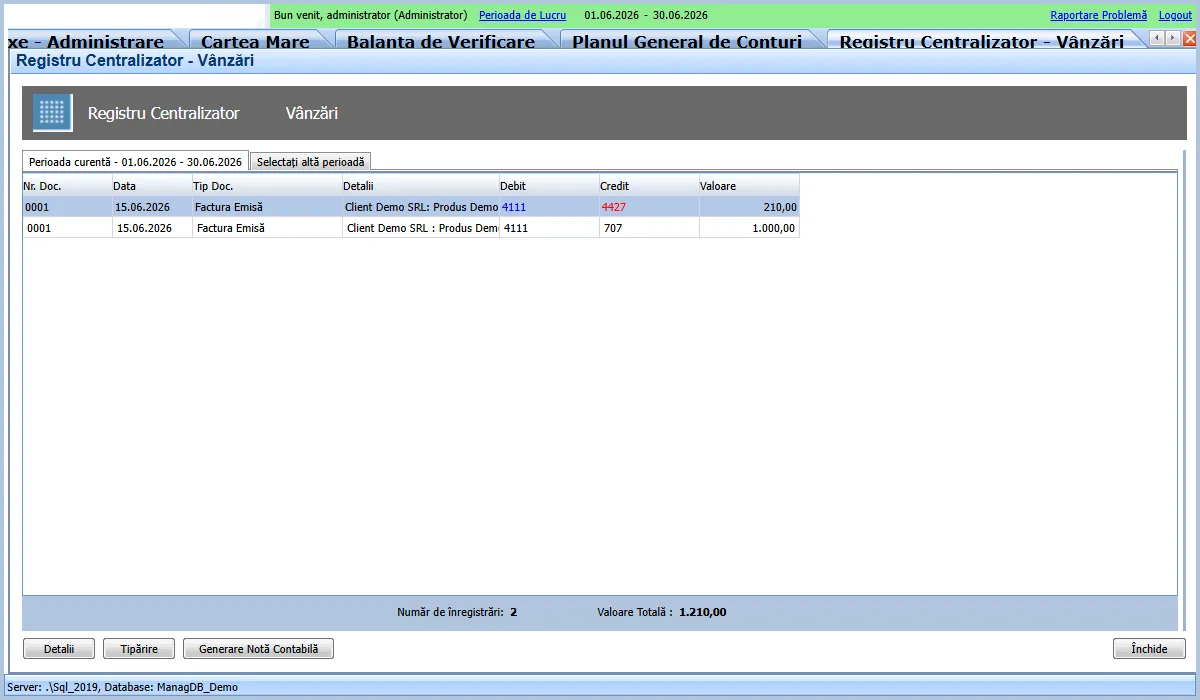
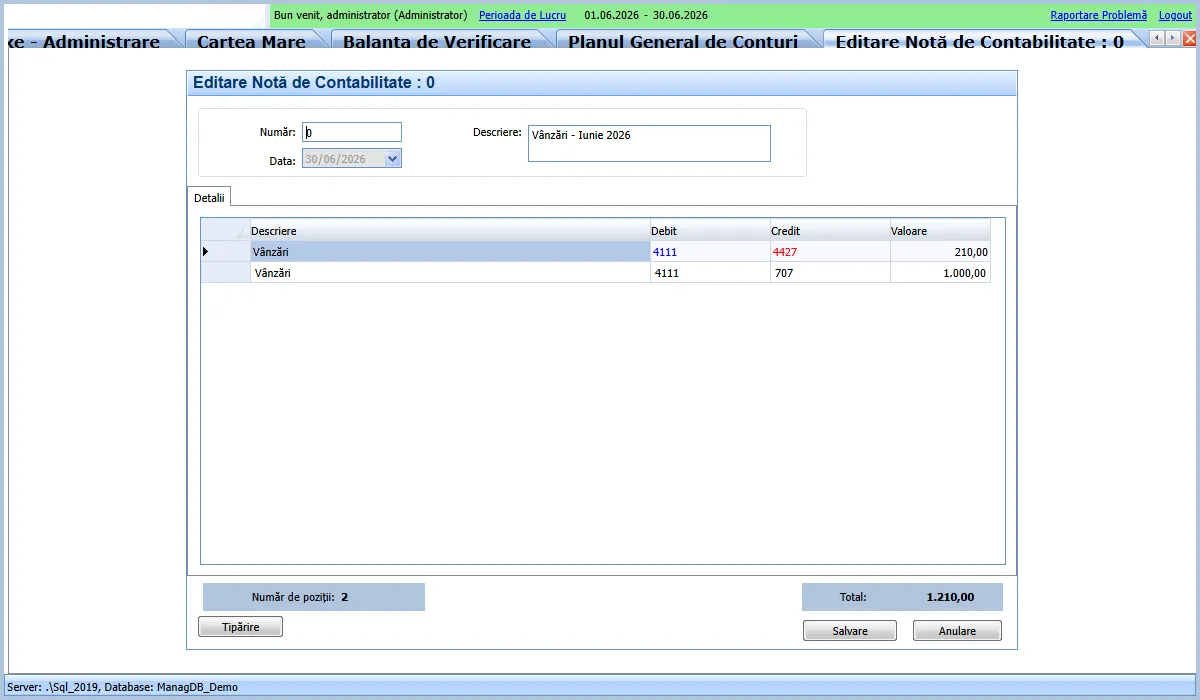
Section titled “2. The Centralizer generates the note”In Accounting > Special Operations > Centralizer Documents > Revenue Centralizer, you press “Generate Accounting Note”. The application produces:
- 4111 (Customers) = 1,000 from 707 (Revenue from goods sales)
- 4111 (Customers) = 210 from 4427 (VAT collected)
That is: the customer owes you 1,210, of which 1,000 is revenue and 210 is VAT collected on behalf of the state. You wrote no note - the Centralizer did, from the invoice.
3. Month close
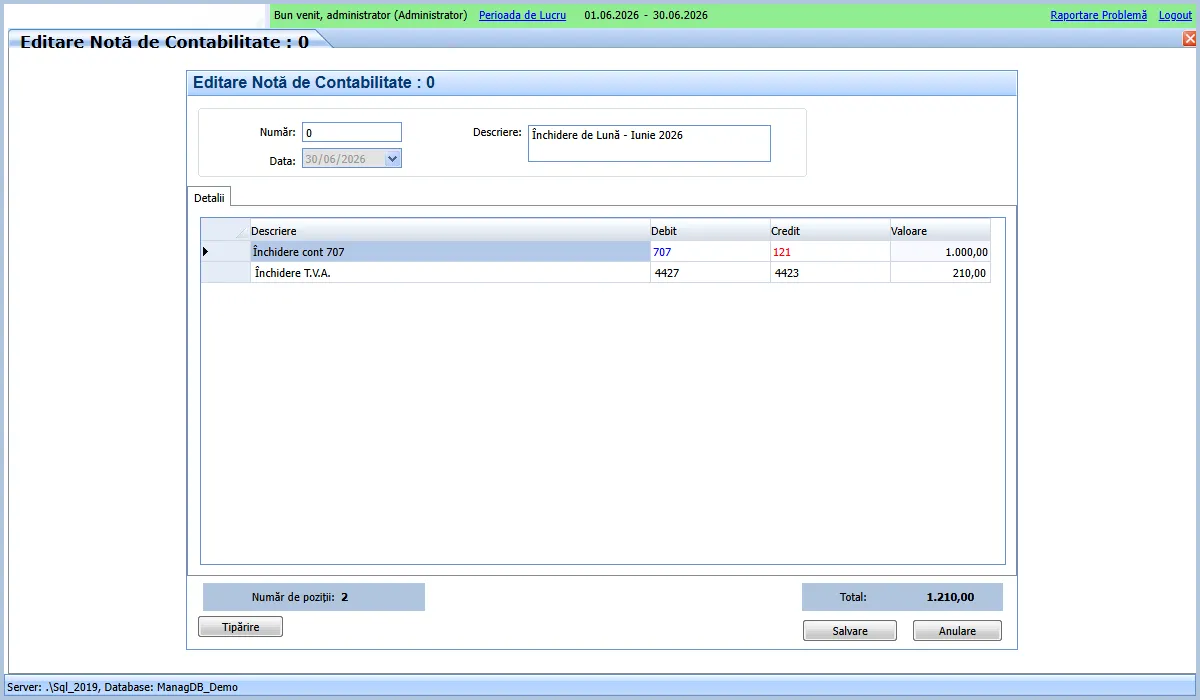
Section titled “3. Month close”In Accounting > Special Operations > Profit/Loss Closing Notes, choose the month (June 2026) and press OK. The application:
- moves revenue to the result: 707 = 1,000 to 121 (Profit and loss);
- settles VAT: 4427 (collected) is netted against 4426 (deductible), giving 4423 (VAT to pay) = 210.
4. The result: the trial balance closes
Section titled “4. The result: the trial balance closes”In Accounting > Ledgers > Trial Balance you see everything, in balance:
- period movements: 2,420 debit = 2,420 credit;
- closing balances: 1,210 = 1,210 (the customer owes 1,210; of which 1,000 profit + 210 VAT to pay).
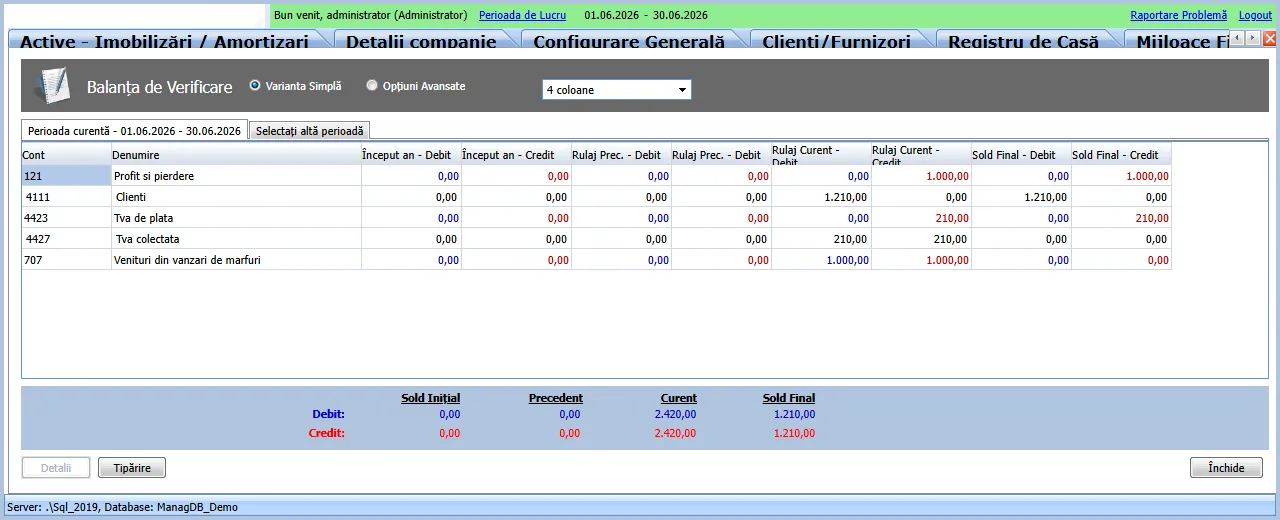
If debit equals credit the accounting is correct - and you computed nothing manually.
Why it matters (accounting transparency)
Section titled “Why it matters (accounting transparency)”- Notes are auto-generated but verifiable. Any note the Centralizer produces is visible in the journal and can be inspected; the accountant has control, the operator has simplicity.
- Every module has its own centralizer. Like sales, cash, bank, inventory and assets each centralize into their accounting note. The logic is the same everywhere.
- VAT up to date. Current Romanian rates are 21% (standard) and 11% (reduced); the application applies them on the document and settles them at closing.
Romanian concepts the documentation explains
Section titled “Romanian concepts the documentation explains”- Centralizer vs manual note - why most notes are auto-generated.
- VAT collected / deductible / to pay (4427 / 4426 / 4423) - how they net at closing.
- Closing to 121 - how revenue and expenses become profit or loss.
- SAF-T D406 - the mandatory monthly return to ANAF, fed from the same data.